
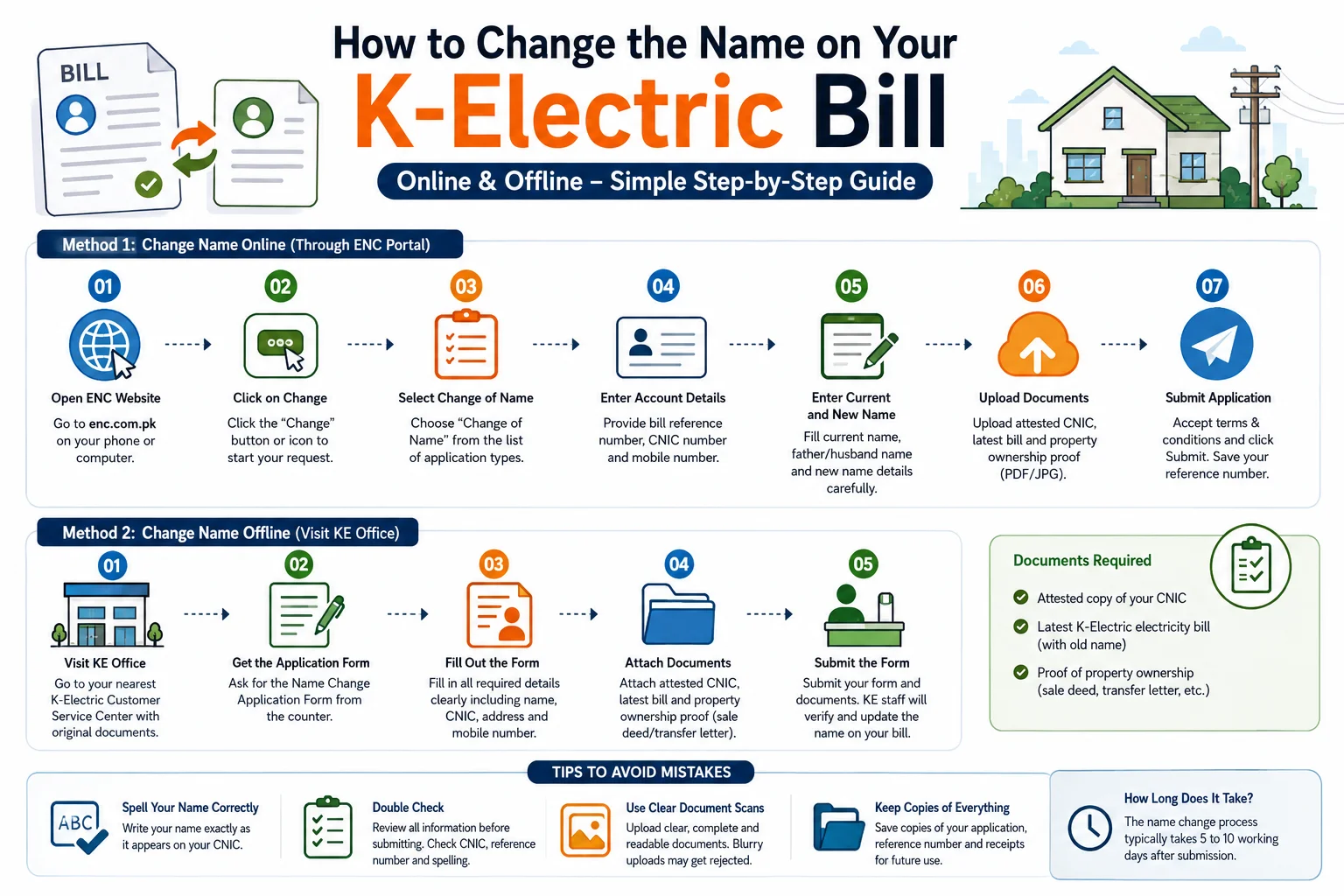
If you have recently bought a property in Karachi that already has an electricity meter installed one of the first things you need to do is update the name on the K-Electric bill. Many new property owners ignore this step and face serious problems later wrong billing records identity issues and even legal complications. This guide will walk you through exactly how to change the name on your K-Electric bill both online and offline in simple steps.
Why You Should Change the Name on Your KE Bill
A lot of people think changing the name on an electricity bill is not urgent. But it is actually very important and here is why:
- Correct Billing Records When the bill is in someone else’s name all payment records connection history and billing details belong to that person not you. If any dispute arises in the future you will have no proof that the connection is yours.
- Identity Verification Your electricity bill is one of the most commonly accepted documents for identity and address verification in Pakistan. Banks government offices and many private institutions ask for a utility bill as proof of address. If the name on the bill is wrong it is useless for verification purposes.
- Avoid Legal Complications If the previous owner has any unpaid dues or disputes linked to that meter and the name is still in their name it can create problems for you. Updating the name protects you legally and makes the connection officially yours.
- Peace of Mind Simply put having the correct name on your electricity bill gives you confidence that your record is accurate and up to date.
What You Need Before Applying
Before you start the name change process make sure you have the following documents ready:
- Attested copy of your CNIC
- Latest K-Electric electricity bill (the one with the old name)
- Proof of property ownership (sale deed, transfer letter, or any legal property document)
Having these ready before you start will make the process much faster and smoother.
Method 1: Change Name Online Through the ENC System
The easiest and fastest way to change the name on your K-Electric bill is through the ENC online portal at enc.com.pk. The ENC system handles all types of account changes including name correction load change and tariff change.
Follow these steps:
Step 1: Open the ENC Website Go to enc.com.pk on your phone or computer. This is the official portal for K-Electric account changes.
Step 2: Click on the Change Button On the homepage you will see a “Change” button or icon. Click on it to begin your application.
Step 3: Select Change of Name From the list of application types select “Change of Name” as your request type.
Step 4: Enter Your Account Details You will need to provide:
- Your bill reference number (found on your KE bill)
- Your CNIC number
- Your mobile number
Step 5: Enter Current and New Name The form will ask you to enter:
- The current name shown on the bill
- The father’s or husband’s name of the current account holder
- The new name you want on the bill
- The father’s or husband’s name of the new account holder (you)
Make sure all names are spelled exactly as they appear on your CNIC. Even a small spelling mistake can cause your application to be rejected.
Step 6: Upload Your Documents Upload clear scanned copies or photos of:
- Your attested CNIC copy
- Latest electricity bill
- Property ownership proof
All files should be in PDF or JPG format and clearly readable.
Step 7: Submit the Application Read the terms and conditions tick the agreement box and click Submit. You will receive a confirmation message or reference number. Save this for future tracking.
Method 2: Change Name Offline at a KE Office
If you are not comfortable using the online system you can also change the name on your K-Electric bill by visiting a K-Electric Customer Service Center in person. This is the manual method and works just as well.
Step 1: Visit Your Nearest KE Office Go to the nearest K-Electric Customer Service Center. Bring all your original documents along with attested copies.
Step 2: Get the Name Change Application Form Ask the staff for the Name Change Application Form. They will provide it to you at the counter.
Step 3: Fill Out the Form Carefully Read the form thoroughly before writing anything. Fill in all the required details clearly:
- Your full name
- Your CNIC number
- Complete property address
- Your mobile number
Do not leave any field blank. Incomplete forms are often returned without processing.
Step 4: Attach Your Documents Attach the following documents to your completed form:
- Attested CNIC copy
- Latest KE electricity bill
- Property ownership proof (sale deed or transfer letter)
Step 5: Submit the Form Hand in your form and documents at the counter. The KE staff will verify your documents and process your request. After verification is complete the name on your K-Electric bill will be updated.
Tips to Avoid Mistakes
These small tips can save you a lot of time and frustration:
Spell Your Name Correctly Always write your name exactly as it appears on your CNIC. Do not use nicknames or short forms. Even one wrong letter can create a mismatch in records.
Double Check Before Submitting Whether you are applying online or in person read through everything one more time before hitting submit or handing in the form. Check your CNIC number, reference number, and name spelling.
Use Clear Document Scans For the online method make sure your uploaded documents are not blurry or cut off at the edges. Poor quality uploads are a common reason for rejection.
Keep Copies of Everything Whether it is your application form reference number or payment receipt always keep copies. These may be needed if any follow-up is required.
How Long Does It Take?
The name change process typically takes 5 to 10 working days after submission. The timeline can vary depending on document verification and the volume of applications KE is processing at the time. You can track the status of your application using the reference number you received after submission.
Frequently Asked Questions
You can change it online through the ENC portal at enc.com.pk or offline by visiting any K-Electric Customer Service Center. Both methods require your CNIC, latest electricity bill, and property ownership proof.
You need an attested copy of your CNIC, your latest K-Electric electricity bill showing the old name, and a legal property ownership document such as a sale deed or transfer letter.
It usually takes 5 to 10 working days after your application is submitted and documents are verified.
Yes. The ENC online portal allows you to complete the entire name change process from home without visiting any office.
The electricity connection is legally linked to whoever’s name is on the bill. Keeping the old owner’s name creates billing confusion, blocks identity verification, and can expose you to legal risks if the previous owner has any unpaid dues.
K-Electric does not charge a separate fee for a name change request. However, any outstanding dues on the meter must be cleared before the name change is processed.
mujy kelectric bill apnay name karwana ha to kia kia requirement hon gee is kay liy jo ap nay details din hain us ki samj nahi arahi online apply kaisy karana ha
Hello Muneeb,
Please read the article carefully — all the details are already there in it.
reference number be nahe confirm horaha
Hello Sheraz,
Maybe You entered the wrong reference number Please enter the account number instead of the reference number.
AT ENC website they are asking for Reference Number which is not available on K.Elecric Bill. please guide
Hello Ali,
Please enter the account number instead of the reference number.
Property lease ke papers ka set to 60 to 70 pages ka hey sab scan karne pare ge ?